Record of Lodoss War Online is a fantasy themed MMORPG based on the classic JRPG series. The game features four character-locked classes, an isometric camera view, point & click gameplay, and a vibrant fantasy world.
[singlepic id=68638 w=428 h=240 float=none]
Publisher: GameOn Playerbase: Low Type: Fantasy MMORPG Release Date: April 6, 2017 Shut Down Date: October 31, 2019 Pros: +Based on a well known franchise. +Isometric camera angle. +Colorful environments. Cons: -No character customziation. -Few classes. -Grind-centric. -Optimization issues.
Tencent Game’s wuxia MMORPG Moonlight Blade is coming Westward, someday. If you can't wait you can play on the Chinese servers, but installing the non-English game can be a daunting task. In a previous guide I explained how to make a QQ account, a requirement for all China-based games. Now that you should, hopefully, have your QQ account number saved you can proceed to download and play the martial arts MMORPG.
[singlepic id=64863 w=600 h=338 float=none]
Edit: January 15, 2018:
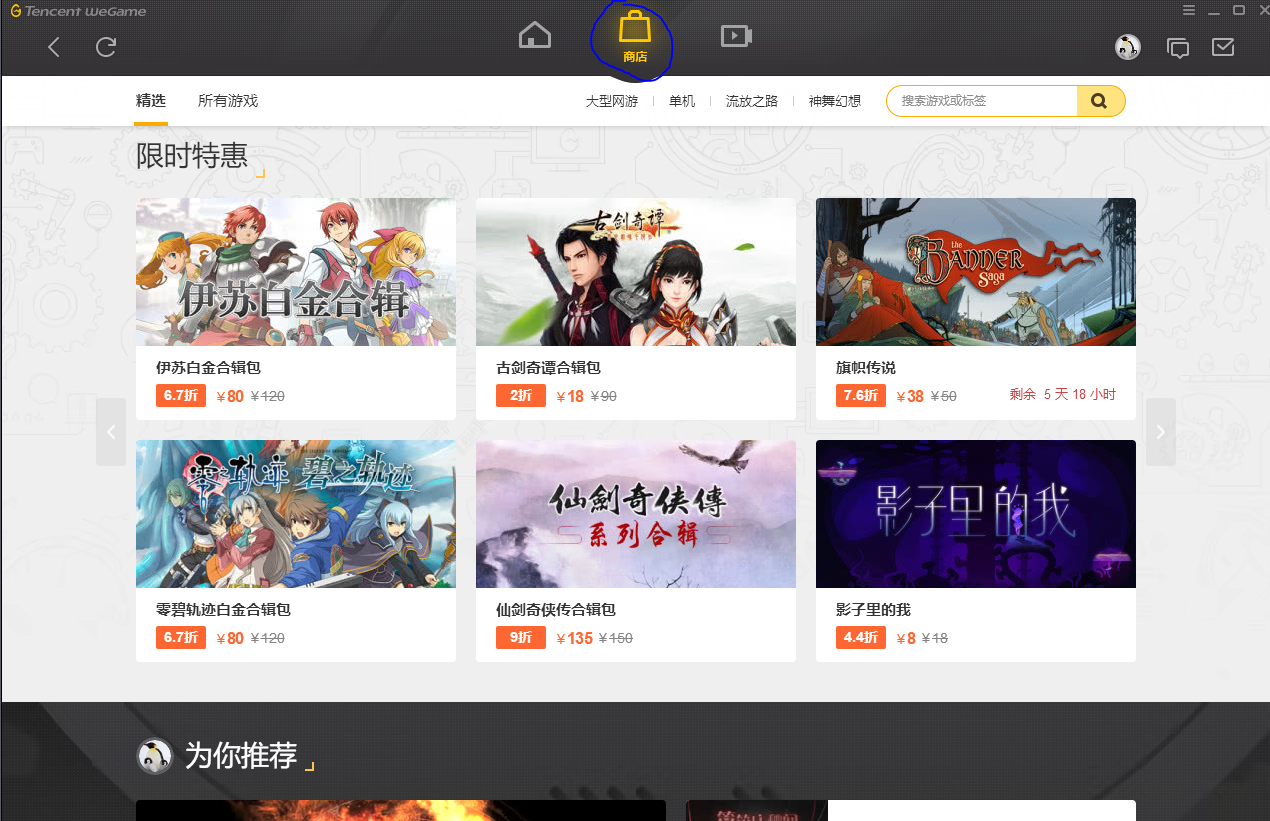
Tencent has re-designed their game launcher and rebranded it as WeGame, so the guide below will be out of date. To install Moonlight Blade through the WeGame launcher, simply launch it, go to the second menu at the top (shown below):
then on the search bar copy and paste this text and hit search: 天涯明月刀
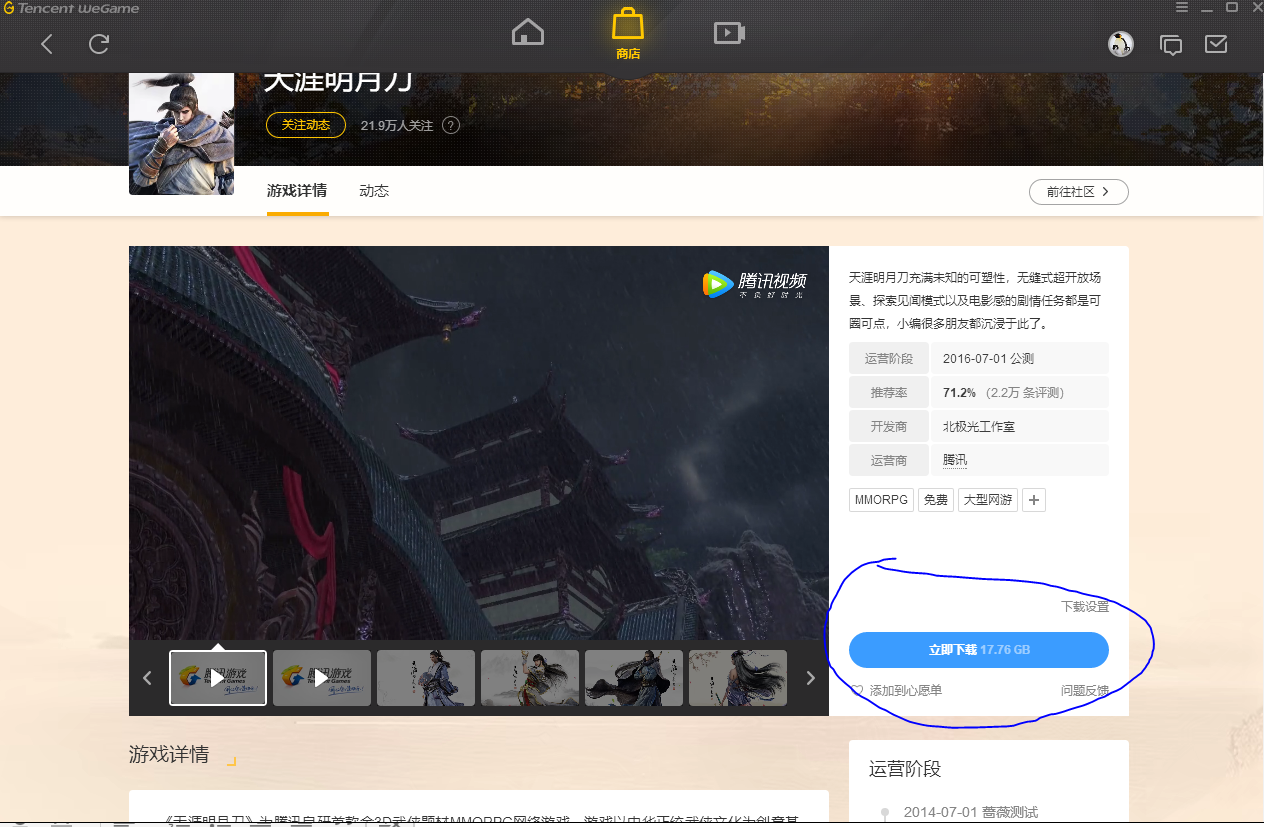
Then select the one game that shows up (it'll be Moonlight Blade). Once one the game page just click on the big blue button shown below to install the game:
--
(the instructions below are outdated, but kept for archival purposes)
1. Proceed to download Moonlight Blade, but not directly. We're going to download TGP (stands for Tencent Game Platform). It's Tencent's version of Steam and makes installing the game easy. Just click the button with the down arrow and "TGP" to begin downloading. It will open a new page and ask you where you want to save the installer.
[singlepic id=64864 w=600 h=338 float=none]
2. You should have an icon somewhere—I typically choose my desktop—that looks like this. Or, it will be in your downloads folder (C:/Users/[Your Username]/Download) if you haven't enabled "choose where to save" in your browser.
Double click the installer.
[singlepic id=64865 w=600 h=338 float=none]
3. You can choose where to install the platform by clicking the gear in the bottom right corner, marked with the box. Then click the button to the right of the path to choose where you want to install it and click the OK button. Click the bottom right button to return to the installer. And press the fat blue icon in the middle to begin installing.
[singlepic id=64866 w=600 h=338 float=none]
4. The install is pretty quick, and you'll see a few boxes pop up as TGP installs all its software. Once it's done you'll be prompted to log in. This is where you need to enter your QQ number so I hope you have it saved. Press the fat blue button to log in and you'll be prompted to solve a captcha to proceed.
[singlepic id=64867 w=600 h=338 float=none]
5. You've made it to the TGP interface. So many icons. But we only need to worry about the sword on the middle-left, which takes us to the Moonlight Blade installation page.
[singlepic id=64868 w=600 h=338 float=none]
6. Just press that big blue button in the bottom right to start the installation. You'll be prompted to choose a directory, for both the download and then the installation. It's a big file, make sure you have over 60 gigs of free space. Once you're set press the center button, and get ready to wait—browse MMOs.com in the meantime.
[singlepic id=65089 w=600 h=338 float=none]
6.A Of course if you don't have the icon it's easy enough to add Moonlight Blade to TGP. Make sure you click the diamond-with-a-box-in-the-middle icon near the top-left of TGP as shown in the image above. Then select the "MMORPG" box in the middle of TGP.
[singlepic id=65090 w=600 h=338 float=none]
6.B Now we can see a whole bunch of games, all of Tencent's offerings. Moonlight Blade should be in the fourth row from the top (barring any more games are added). You can use the screenshot above to find the right one. Click that image.
[singlepic id=65091 w=600 h=338 float=none]
6.C You should be on the Moonlight Blade splash page. Just click the fat blue button on the right side of your screen to begin installing.
[singlepic id=37624 w=600 h=338 float=none]
7.Back to business. ...Now you can take the time to teach your computer to read Chinese. Otherwise, when you enter the game it crashes. So we head to Control Panel and find Language, ordinarily located under Clock, Language, Region. Click "Add a Language" and from the list that’s drawn up pick Chinese (simplified).
[singlepic id=37625 w=600 h=338 float=none]
8. Underneath your language tab you should now see both English and Chinese (simplified).
[singlepic id=37626 w=600 h=338 float=none]
9. But we’re not done yet. Now we have to head to the Region tab. Clicking Region will pull up a window, but we’re only interested in the tab that says Administrative. From the Administrative tab click "Change System Locale" and change it from English (United States) to Chinese (Simplified).
You will have to restart your computer after this step. But make sure you’re not still installing when you do. And in case you're worried, changing the language to Chinese will not change your desktop icons and panels to Chinese (simplified).
[singlepic id=64869 w=600 h=338 float=none]
10. You finished installing? Great, now you get to patch. Press that blue button again and go back to browsing MMOs.com.
[singlepic id=64870 w=600 h=338 float=none]
11. Once you're done patching, press that blue button again and... Congratulations, you're ready to play Moonlight Blade.
A few things to note. The TGP installs some annoying, but evidently harmless, software: optimization shenanigans that you don't need. When you exit the game they'll continue to run but you can shut them off from your Task Manager: just turn off anything that's written in Chinese.
Now that China is an explosive powerhouse in the gaming industry the country is host to numerous titles that take their time gracing Western shores. And players can test foreign releases from South Korea and Japan that premiere in China prior to North America and Europe. But in order to play non-region locked Chinese games eager players have to register an account with Tencent’s QQ service. Players with a QQ account will be able to play games such as Blade & Soul and Moonlight Blade on Chinese servers.
The first step is to register a QQ account. It’s a service as a result of China's Internet Management regulations, to ensure that players under the age of 18 aren’t exposed to explicit content. How age verification is enforced is another story. Of course no one would go on the internet and lie, but just in case, the People’s Republic has ensured no one can confuse Buster Baxter.
[singlepic id=37528 w=600 h=338 float=none]
1. Visit the official QQ Account Registration Page (It’s in English so no worries, yet). Fill in your information, and you'll be taken to a page asking you to enter in your mobile number. Unfortunately, there's no way around using a phone number. I used my own and haven't add any issues.
You do need to press the blue text that says "select you country/region" and change it to your own country or region, e.g. mine is the United States so in region box it says "United Stats 001."
[singlepic id=64862 w=600 h=338 float=none]
Known Issues:
You may hit a brick wall at this stage. Some users report that when they enter their phone number and hit "Submit," they receive the error message "Servers are busy" or "Please try again... due to high volume of setups from your IP." I only received this error when I tried to use the same phone number to sign up for a second account. Although, other members of the MMOs.com team have had the same issue with never before used numbers.
If you have this issue my suggestion is to try a different number or wait a few hours before trying again: it is possible that the servers are overloaded.
If you're successful, you'll be given your QQ number, which you want to save somewhere safe, like in a Notepad document. Your QQ number is your account number. It's how you'll log in to a game like Moonlight Blade.
[singlepic id=37529 w=600 h=338 float=none]
2. Next, head to the Identity Verification Page, and click the blue button on the left side of your screen. Login with your account information.
[singlepic id=37530 w=600 h=338 float=none]
3. You’ll then be taken to the page above. If, like me, you weren’t automatically redirected refresh the page or re-click the Identity Verification link. You’ll click the blue text at the bottom that says “*使用其他有效身份证注册。” or roughly in English: “Use other valid ID to register." Clicking here will take us to a verification page that asks for your passport number.
[singlepic id=37532 w=600 h=338 float=none]
4. In this page there 4 parameters to worry about:
真实姓名 or “Actual Name”
有效证件 or “Valid Documents”
There are three choices from a drop-down menu and you want to pick the third one that says “Passport.” You don’t have to use a real passport number but you will want to use a number you can remember. It will be used to reset your password in the event you forget it or your account is hacked. Passports are nine digits long.
出生日期 or “Date of Birth”
It’s listed Year, Month, Day. As long as you ensure that your birthday places you above the age of 18 you won’t have any issues. You give your actual birthday on the internet right?
联络地址 or “Address,”
[singlepic id=37531 w=600 h=338 float=none]
And then click the blue button on the left, that says “Confirm”
[singlepic id=37533 w=600 h=338 float=none]
5. And that’s it you're done. The fourth sentence from the top should say 年龄:已满18岁, meaning you're at least 18 years of age. Congratulations on universally being recognized as an adult, and your ability to play foreign games.
Lost Saga is a 3D MMO Beat ‘em Up that features a variety of game modes where players can battle against each other in a variety of PVP maps, or work together in cooperative PVE dungeons.
[singlepic id=25111 w=428 h=240 float=none]
Publisher: Z8Games Type: MMO Release Date: November 17, 2009 Shut Down: September 13, 2019 Pros: +Huge roster of playable characters. +Fluid and fast paced combat. +Lots of game modes. Cons: -Odd hit detection at times. -Some pay to win elements. -Grindy PvE.
Tera: Rising is a 3D Fantasy MMORPG with engaging, action-packed gameplay. Players must manually block, dodge, and slash their way through enemies as they explore the lush world of Tera. With a wide range of races, classes, and skills to master, Tera offers a compelling MMORPG experience.
[singlepic id=4712 w=428 h=240 float=none]
Publisher: Krafton Blue Hole Type: MMORPG Release Date: May 1, 2012 (NA) Shut Down Date: June 30, 2022 PvP: Duels / Battlegrounds / Open World Pros: +Fluid graphics and gameplay. +Guild battles and political system. +Dynamic combat and skill targeting. +Gamepad support. Cons: -Repetitive questing during mid levels. -Poor crafting system.
Kritika Online, also known as Kritika: REBOOT, is an anime-styled 3D MMORPG that features action-packed gameplay, supported by a variety of playable classes that deal massive damage. Enter a variety of instances or PvP battlegrounds to chain skills for combos and attain experience to level up.
[singlepic id=42141 w=628 h=275 float=left]
Publisher: Allm Co / Com2uS Type: Action MMORPG Release Date: June 8, 2016 Relaunched as Play2Earn Game: June 8, 2022 PvP: Team-based Battlegrounds Pros: +Variety of playable classes. +Distinct anime-styled graphics. +Stylish combat animations. Cons: -Limited character customization.
Star Trek Online, STO for short, is an epic 3D sci-fi MMORPG based on the popular Star Trek franchise. The game features story-driven gameplay that largely follows the Star Trek canon. Players command their own star ship within the vast Star Trek universe and can also complete ground missions.
[singlepic id=5591 w=428 h=240 float=none]
Publisher: Arc Games Playerbase: High Type: MMORPG PvP: Duels / Factions Release Date: Feb 2, 2010 (NA/EU) Pros: +Excellent foundry system (player-made missions). +Great story. +Solid character customization. +Good reputation system. +Tons of content. Cons: -Controls and interface can feel clunky. -Cash shop items very powerful.
Elsword Online is a 2.5D side-scrolling anime-inspired fantasy MMORPG from KOG Games that features action-oriented combat. Elsword is a beat-em-up style game that features 50+ unique dungeons to explore with an excellent variety of playable classes.
[singlepic id=1706 w=428 h=240 float=none]
Publisher: KOG Games Playerbase: Medium Type: MMORPG PvP: Arena (1v1/2v2/3v3/4v4) Release Date: March 23, 2011 (NA/EU) Pros: +Good variety of playable characters and classes. +Fun combos/combat mechanics. +Great music. Cons: -Cash shop dependent. -Balance issues. -Game nickle and dimes you.
Rift is a 3D fantasy MMORPG set in the expansive world of Telara. The game offers a unique and extensive class system, player housing, and dynamic zone-wide events. Rift is feature-rich and well-suited for traditional MMORPG fans looking for a truly epic world to explore.
[singlepic id=4456 w=428 h=240 float=none]
Publisher: Trion Worlds Playerbase: Low Type: F2P MMORPG Release Date: March 1, 2011 PvP: Duels / Battlegrounds / PvP Servers Pros: +Massive amount of content to play through. +Rifts create dynamic gameplay experiences. +Extensive class customization. +Balanced cash shop. Cons: -Limited race selection. -Only a few builds viable in late game. -Generic MMORPG combat, user interface, and questing features.
Cosmic League is an action-packed arena shooter pitting anime-inspired humanoids and robots against each other in 10v10 matches. Choose one of six specialized classes and dominate the battlefield in dynamic arenas.
[singlepic id=38747 w=428 h=240 float=none]
Publisher: Cyberstep Playerbase: Medium Type: MMO Shooter Release Date: December 10, 2015 Shut Down: April 12, 2017 Pros: +Multiple league modes. +Anime aesthetic. +Distinct classes. +Good customization options. Cons: -Cluttered and confusing interface.


 (63 votes, average: 3.49 / 5)